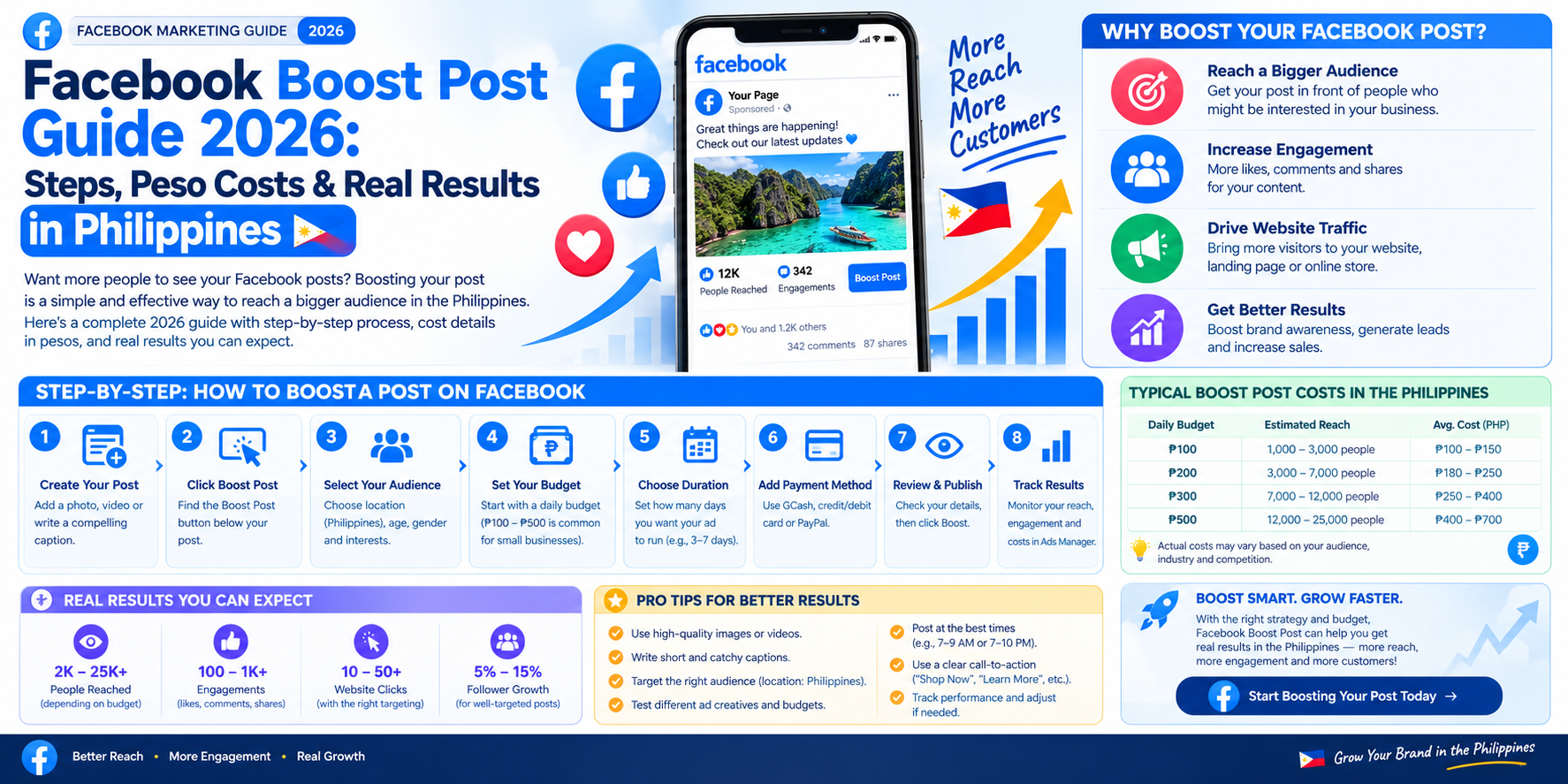
Facebook Boost Post Guide 2026: Steps, Peso Costs & Real Results in Philippines
If you run a business page in the Philippines, you already know the drill. You post a great photo of your bestseller, write a caption you're proud of and then barely anyone sees it. That's not bad luck. That's just how the Facebook algorithm works today, which is exactly why so many Filipino sellers search for a facebook boost post almost every week.
The Philippines is one of the most Facebook-heavy countries on the planet. Figures from DataReportal put the number of Facebook users in the country at around 95.8 million people, or roughly 82% of the entire population. Almost every small business, from a home kitchen in Iloilo to a clothing reseller in Quezon City, lives and breathes through their Facebook Page. So when organic reach dries up, boosting becomes the fastest fix most owners reach for.
Quick answer: to boost a post, open your Page, find the post you want, tap the blue Boost this post button, then choose your goal, audience, budget and duration before confirming payment. The whole thing usually takes less than five minutes.
What Is a Facebook Boost Post?
A facebook boost post is a paid promotion built directly from something you've already published on your Page. Instead of writing a fresh ad from zero, you take an existing Facebook post — a photo, a video, an announcement — and put money behind it so it reaches people beyond the small slice of followers who'd normally see it in their feed.
Meta introduced the boost button back in 2012, long before most small businesses had the time or budget for a full Facebook ad campaign. It's what Meta itself describes as a lightweight ad and that description fits well. You'll find the button sitting quietly under eligible posts whether you're on the mobile app, a desktop browser or inside Meta Business Suite. Once it's live, your promoted post picks up a small "Sponsored" tag, which is the only visual sign separating it from organic content. Everything else stays exactly the same.
How Does Facebook Post Boosting Work?
Here's the part most people skip past. Clicking Boost this post doesn't create some separate, simpler system running quietly in the background. It drops your post straight into Meta's regular advertising auction, the same one used by every full campaign built in Facebook Ads Manager. Your post competes for the same ad placements across Facebook, Instagram and Messenger. Pricing runs on the same cost per thousand impressions logic too, so bigger and more competitive audiences cost more to reach. That part never changes, boosted or not.
What actually differs is the setup experience. A full campaign walks you through campaign, ad set and ad levels separately, with dozens of toggles along the way. Facebook post boosting compresses all of that into one screen — goal, audience, budget, duration, payment — then gets out of your way. Once you submit it, Meta reviews the ad, usually within minutes, though it can occasionally stretch to 24 hours during busy periods. Approved, it runs. Rejected, you'll get a reason and a chance to fix it.
How to Boost a Facebook Post? Step by Step
Here's the actual walkthrough. It's short but each step matters more than it looks on the surface.
Before You Begin
Make sure you're working from a proper Facebook business Page, not a personal profile, since Meta stopped allowing personal boosts years ago. You'll also need admin or advertiser access on that Page, plus a valid card or e-wallet linked to your Facebook ad account. And the post itself needs to already be live, not sitting as a draft.
One habit worth building: let a new post sit for a couple of hours first. If it's already picking up Facebook reactions and comments on its own, that's a far stronger signal than boosting something cold.
Step 1: Choose a Facebook Post to Boost
Pick a high-performing post, not just whatever you published most recently. A popular post already earning Facebook shares and comments tends to keep performing once you put money behind it, because Meta reads that early engagement rate as a quality signal. According to Modern Chameleon PH, a Cebu-based digital agency, one of the most common local habits is what they call the "boost post trap" clicking Boost on a random ₱500 post and hoping for sales, when the post was never strong enough to convert in the first place. Cheap impressions on a weak post are still just cheap impressions.
Step 2: Select Your Campaign Objective
Your campaign objective tells Meta what success looks like for this particular boost. You can choose engagement, messages, website traffic, calls, leads, video views, more Page likes or simply let Facebook decide automatically based on your content.
This step trips up a lot of first-timers. A Filipino online seller closing sales mostly through Messenger should pick "more messages", even if engagement sounds more exciting on a dashboard. The objective you pick shapes exactly who Meta shows your ad to.
Step 3: Choose Your Target Audience
This is where a boost either earns its budget or wastes it. You can lean on a saved audience you've used before, build a fresh custom audience from your own customer list or let Meta generate a lookalike audience based on people who already bought from you. Manual targeting covers age, gender, location targeting and interest targeting. Combining a few of these through detailed targeting usually beats leaving everything on default. A practical tip: narrow by region — Metro Manila, Cebu, Davao, wherever your actual buyers are — rather than targeting the whole country, then exclude recent customers so your budget isn't repeating on people who already checked out.
Step 4: Set Your Budget and Duration
Meta's technical floor sits around one US dollar a day but that number barely matters in practice. Realistic Facebook boost cost for small Philippine businesses runs somewhere between ₱100 and ₱600 per day, typically over a two-to-seven-day stretch.
You'll choose between a daily budget that spreads spend evenly and a lifetime budget that Meta paces automatically across your chosen duration. Keep shopping-season timing in mind too. The 11.11, 12.12 and Christmas rush all push advertising costs upward simply because more sellers are bidding for the same eyeballs at once.
Step 5: Review and Publish Your Boost
Before you hit publish, glance at your ad placements. The Advantage+ placements default spreads your boost across Facebook Feed, Instagram, Messenger and Stories and you can deselect anything that doesn't fit your brand.
Confirm your payment method, tap Boost post now and Meta takes it from there through its standard ad review process. Once it's approved and running, your campaign results show up inside Meta Business Suite's Ads tab or Ad Center, where you can track everything as it happens.
How to Boost a Single Facebook Post Quickly?
Sometimes you don't need the full explanation. You just want the fastest route to promote a Facebook post you already understand. The short version: tap the boost button under the post, set your goal, audience, budget and duration on one screen, confirm your payment method and you're done. Three taps, basically, once you know what you're choosing at each screen.
Where that button lives changes slightly depending on where you're working, which trips people up more often than you'd think.
- Facebook mobile app — the button sits directly under the post on your Page.
- Facebook desktop — look for the blue "Boost post" button beneath the post.
- Meta Business Suite — open the Posts & Stories tab, then click Boost next to the post.
How to Set Up an Automated Facebook Boost Campaign?
Worth clearing up early. Meta doesn't hand you one single native button labeled auto-boost. True automated boosting runs through one of two routes — Ads Manager's built-in automated rules, which pause or scale boosts already running based on performance, or a connected scheduling tool such as Hootsuite, which watches your organic posts and triggers a boost automatically once one crosses a threshold you've set. Either route saves time once your posting volume grows past a handful per week. Below that, honestly, manual boosting is still faster.
Step 1: Set Up Your Campaign Rules
Start by naming your automation and choosing which post types qualify for automatic post boosting — photos, videos, links, status updates, whichever formats you actually publish. You'll also set a cap on how many posts can run as boosted content at the same time, so your budget doesn't spread across ten posts when three would've done the job just as well.
Step 2: Choose Your Audience and Budget
Assign a saved audience or an Advantage+ audience up front, since every post that qualifies later inherits this same targeting. Set the per-post campaign budget and promotion duration here too so nothing needs manual adjusting once the system starts running on its own.
Step 3: Set Your Auto-Boost Criteria
This is where the thresholds live an engagement rate above three percent, say, or a minimum count such as 100 likes and 15 comments within six hours of posting. Most tools let you combine conditions with AND/OR logic, so a post only qualifies once it clears every rule you've set. Once it does, the system creates the ad on its own with no manual clicking required.
Boosted Post vs Facebook Ad: What's the Difference?
Both a boosted post and a full Facebook ad land in the exact same auction and show up wearing the exact same Sponsored label. The real gap sits in how much control you get during setup and how much data you get back afterward.
- Starting point — a boost begins from a post you already published, while an ad is built from scratch inside Ads Manager.
- Objectives available — boosting covers engagement, awareness and traffic. Ads Manager opens up the full funnel including conversions and sales.
- Targeting depth — boosts give you basic suggested audiences. Ads Manager lets you layer custom and lookalike audiences on top of each other.
- Placement control — mostly automatic through Advantage+ on a boost, fully manual placement by placement in a campaign.
- Creative testing — one version only with a boost, full A/B testing across multiple ads in Ads Manager.
- Tracking — reach, engagement and basic clicks versus proper Meta Pixel conversion tracking and ROAS reporting.
- Best suited for — boosting wins on fast visibility and tight budgets. Campaigns win on performance-driven social media advertising.
If your goal this week is simply more eyes on a good post, boosting gets the job done. If your goal is tracked sales and a measurable return on ad spend, a proper campaign built in Ads Manager is the better investment of your time.
How Much Does a Facebook Boost Post Cost in the Philippines?
There's no single fixed price tag here. Cost depends on your audience, your niche and how much competition Meta's auction is dealing with that week. Based on current benchmarks for Philippine advertisers, small business test budgets typically land between ₱100 and ₱600 per day. Cost per click usually falls between ₱1 and ₱15 for a broad consumer audience, climbing toward ₱20 to ₱35 in tougher categories like finance or real estate. Cost per thousand impressions tends to sit around ₱120 to ₱450 depending on how narrow your audience targeting gets.
- Test spend, ₱100 to ₱300 a day — right for trying a new offer or a new creative for the first time.
- Standard spend, ₱300 to ₱600 a day — suits proven posts and everyday local promotions.
- Scaled spend, ₱1,000 and up — only worth it for content that's already performing well organically.
Real example: marketing consultant Lilach Bullock documented a Cebu-based skincare brand that started with a modest ₱500 per day test spread across a single boosted post for one full week, before eventually moving into structured campaigns inside Ads Manager once the content had proven itself worth scaling.
Your own numbers will land somewhere near that range too. And honestly, the daily budget figure matters less than cost per result cost per message, per lead, per genuine sale. A ₱200 boost that brings in five real customer inquiries beats a ₱1,000 boost that only bumps up your like count.
Pros and Cons of a Facebook Boost Post
Like most shortcuts, boosting trades some control for speed. Knowing exactly what you're trading helps you decide when it's the right tool and when it isn't.
Benefits of Boosting a Facebook Post
The biggest draw is simply speed. You can go from idea to live paid post in under five minutes, with zero design or ad-writing skill required. It extends your post reach well past the roughly five to ten percent of followers who'd normally see an unpaid post, which makes it genuinely useful for Facebook Page promotion on a shoestring budget.
It also shines for anything time-sensitive a flash sale, a one-day event, a limited restock. And even when a boost doesn't sell much directly, the post engagement it generates often becomes useful social proof for whatever you run next.
Limitations of Boosting a Facebook Post
The targeting is intentionally shallow compared to what Ads Manager offers and there's no built-in way to A/B test two versions of the same post against each other. The objective menu is narrower too, without the direct sales-optimization options a full campaign gets through Meta Pixel tracking. Cost per lead usually runs higher than a properly structured campaign would deliver. The reporting you get back stays fairly thin as well — reach, engagement, basic clicks, with no breakdown by placement or audience segment.
Who Should Use a Facebook Boost Post?
Boosting fits best for solo entrepreneurs and small Facebook marketing budgets. The sari-sari store owner running a weekend promo, the home baker announcing a new flavor, the tutor promoting an enrollment deadline. It also works well for event organizers and creators who just want to see what content resonates before committing serious money anywhere.
It's a weaker fit for anyone chasing a precise ROI number, or a brand that already has Meta Pixel installed and wants full conversion tracking across a real sales funnel. If you've got the time and the budget to build a proper campaign, Ads Manager will almost always out-earn a simple boost in the long run.
How to Edit Your Facebook Boost Settings?
Once a boost is live, head into Ad Center or Meta Business Suite to adjust your settings. You can usually tweak the remaining budget, extend or shorten the duration and in some cases refine the audience mid-run. What you can't touch is the campaign objective or the underlying media itself. Changing the photo or video means pausing the boost and starting a fresh one rather than editing the current run. Pausing and resuming a boost campaign is straightforward from Ad Center whenever you need a quick break in spending.
Can You Edit a Facebook Post After Boosting It?
Small tweaks like fixing a typo in the caption or correcting a price usually go through without breaking anything. Swapping the image, video, link or call-to-action button typically forces Meta to re-review the boosted content, which can pause delivery for a while until it clears again. The safer habit is finalizing your copy and creative before you boost, rather than treating a live boost as a rough draft.
How to Manage Boosted Posts Properly?
Managing a handful of boosts by memory works fine for a while, until it doesn't. Two habits keep things from slipping through the cracks.
Track Boosts in Your Content Calendar
Meta Business Suite's Planner shows scheduled, published and boosted posts side by side, which means you can decide ahead of time which posts deserve budget instead of scrambling to boost something reactively after it already went out. For anyone managing multiple Pages, this view alone saves a lot of guesswork.
Review Your Boost Performance
Check Ad Center or Business Suite Insights regularly for reach, impressions, clicks and engagement rate, then compare those numbers against what the post was already doing organically before you spent a peso on it. If a boost clearly isn't earning its keep by day two or three, pausing it early beats letting the whole budget run out on autopilot.
Pair Boosting With Steady Organic Growth
Paid reach fades the moment your budget stops. That's the trade. A page with a healthy follower base and consistent Facebook engagement keeps pulling traffic between campaigns, which makes every future boost cheaper because Meta already has strong signals to work with. Filipino sellers who mix both usually get further on less money. Steady posting, a growing audience through services like BoostingPH and paid boosts saved for genuinely strong content — that combination stretches a small budget much further than boosting everything blindly.
Facebook Boost Post FAQs
Why Does My Facebook Post Say Boost Is Unavailable?
A handful of post types simply can't be boosted. Cover photos, profile pictures, shared posts and shared albums all fall into that category, along with unpublished drafts and expired offers. Links carrying a Facebook click ID (that "fbclid" string) can also block a boost and so can an unpublished Page or missing Page permissions on your account. Finally, check whether your ad account itself is restricted or your payment method needs updating, which is a common and easily fixed culprit according to Meta's Help Center.
Why Does My Facebook Boost Have an Error Status?
Nine times out of ten it comes down to a declined or expired payment method. The next most common cause is a boost rejected for a policy issue — too much text crammed onto an image, or a claim Meta's system flags as prohibited. An active restriction on your Page, or occasionally just a temporary system glitch, can also trigger an error status. Before resubmitting, check your Page Quality or Account Status first, then double-check your billing details.
What Is a Hot Post on Facebook?
A hot post isn't one official term Meta uses everywhere. It's more of a functional description you'll see across Insights and third-party scheduling tools. It simply means an organic post already outperforming your Page's usual pace, which makes it a strong candidate to boost while that early momentum is still fresh rather than waiting until interest cools off.
How Long Should a Boost Run?
Two to seven days suits most local promos. Anything shorter rarely gives Meta enough delivery data to optimize properly and anything much longer tends to hit the same audience repeatedly, which pushes your cost per result upward.
Is a Facebook Boost Post Worth It?
For the right job, yes. A facebook boost post earns its ₱200 or ₱500 when the goal is quick visibility, fast content testing or pushing a time-sensitive local promo without needing a marketing team to set it up. It's fast, it's cheap to test and it works especially well in a market as Facebook-dependent as the Philippines.
Where it falls short is precise, trackable sales ROI. That job still belongs to a properly built campaign in Ads Manager, complete with Meta Pixel and real conversion tracking. The smartest approach most Filipino businesses land on eventually is a hybrid one — boost cheaply first to find out what resonates, then rebuild whatever wins as a full campaign once it's already proven itself organically.